ShoWorks Updates

Updates for ShoWorks users
Please read the following completely before downloading any update file. Versions prior to ShoWorks 2020 are no longer supported.
All patches are cumulative and update any sub-version (i.e. you do not need to use prior patches).
To update your version of ShoWorks to the most recent, first find out if you already have the most current version by selecting "About ShoWorks" from the Help menu from within ShoWorks.
To update:
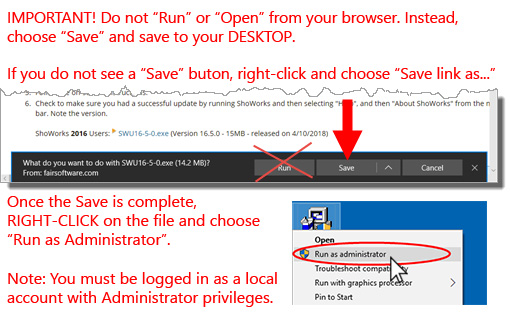
- Download the update patch by clicking on the file below choosing "Save" and save the file to your Desktop. (Do not choose "Run" or "Open" and note where you save the file to)
- Make sure that you do NOT have ShoWorks running (ensure that you have exited ShoWorks).
- Locate the file that you just downloaded and right-click on the file and choose Run as Administrator.
- Click 'Yes'.
- Follow the on-screen instructions.
-
Check to make sure you had a successful update by running ShoWorks and then
selecting "Help", and then "About ShoWorks" from the menu bar. Note the
version.
ShoWorks 2020 Users: SWU20-4-0.exe
(Version 20.4.0 - 14MB - released on 1/14/21) Support for ShoWorks 2020 ends 12/31/24. Upgrade to 2024 is required prior to this date.
SWU20-4-0.exe
(Version 20.4.0 - 14MB - released on 1/14/21) Support for ShoWorks 2020 ends 12/31/24. Upgrade to 2024 is required prior to this date.
It is recommended that you update to this latest patch. For changelog information on new features, enhancements, and fixes found in the ShoWorks update patch, see https://fairsoftware.com/updatehistory.aspx
